articwriter
✍️ ArticWriter
ArticWriter is a ⚡ powerful block-based article editor with an integrated HTML renderer. Write your content with flexible blocks, customize your tools, and render clean HTML — all from a single package.
Version 0.1.0 Changelog:
- Removed built-in block type dependence
- Added Block Based configuration
- Added
Flag Section Title as Table of Contentoption (Spacial) - Plugin usage made easier
- TypeCasting made more Editor Friendly
🌐 Demo
Checkout Demo of articwriter
🚀 Features
- 🧱 Block-based article writing
- ✨ Inline tools support
- 🧩 Custom editor block plugins
- 🔧 Inline tool plugins
- 🎨 Renderer block plugins
- 🎨 Per-block Style Customization (renderer)
- 🌙 Dark Mode supported
- ⚛️ Optimized for React projects
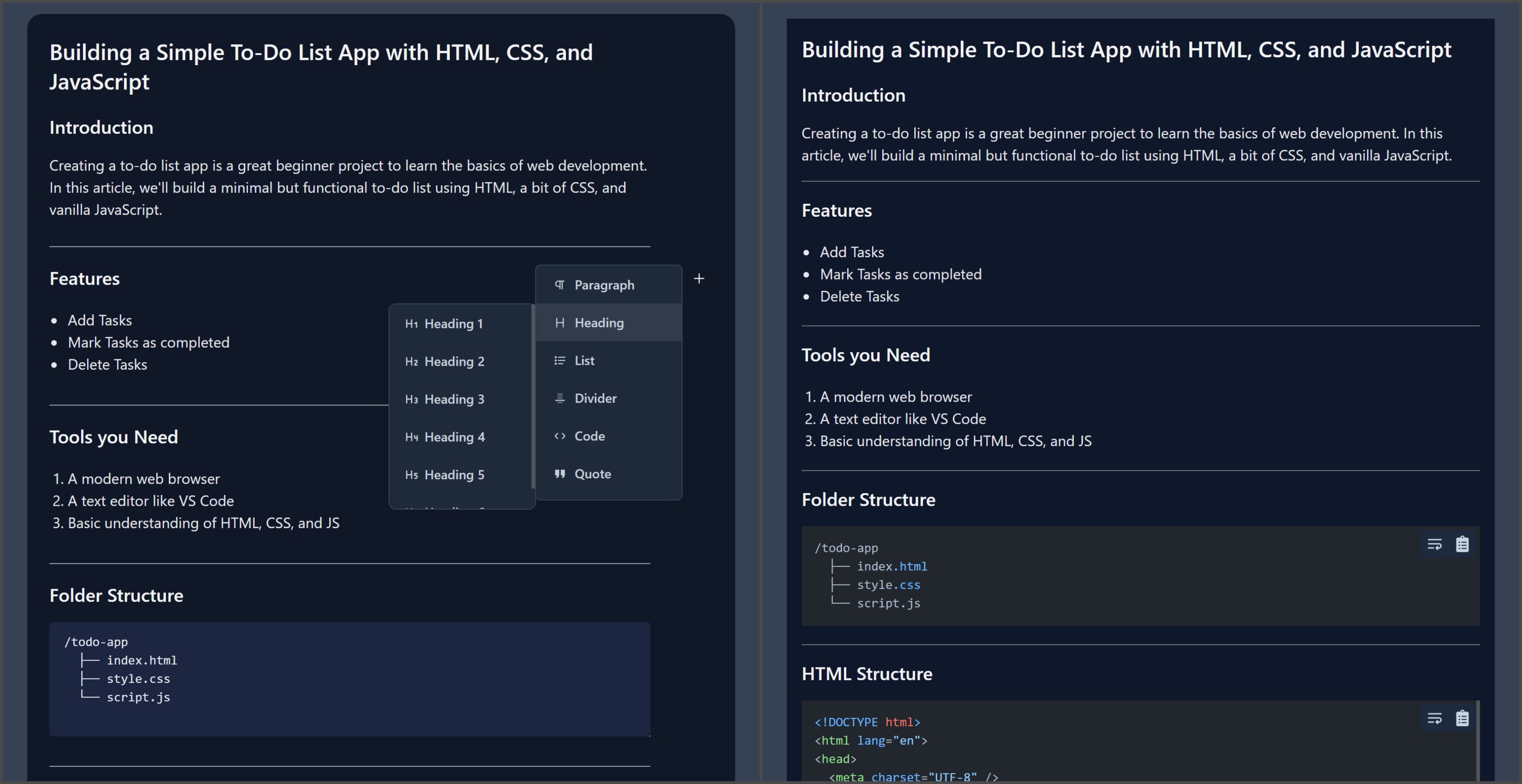
🖼️ Preview
Editor and Renderer side by side:
📦 Installation
Using npm:
# using npm
npm install articwriter

# using yarn
yarn add articwriter
📁 Package Structure
articwriter/
├── editor     # The full-featured editor
└── renderer   # HTML renderer for the written content
editor→ Used to create and manage blocksrenderer→ Used to render the saved content
📌 The root package does not export anything directly.
🔧 Examples
Editor
import Editor from "articwriter/editor";

const [Component, save] = Editor({
    config: {
        uploadImage: async (file) => {
            return `file_url.png`;
        },
    },
});

return (
    <>
        <Component />
        <button
            onClick={async () => {
                const data = await save();
                console.log(data);
            }}
        >
            Save
        </button>
    </>
);
Renderer
import Renderer from "articwriter/renderer";

const [Component] = Renderer({
    // config
});

return <Component blocks={blocks} />;
⚙️ Configurations
Editor
| Prop | Type | Description |
|---|---|---|
| blocks | List |
Initial blocks data to load in the editor |
| defaultBlock | string |
Default block type (e.g. "paragraph") |
| plugins | List |
Editor plugin which follows the Plugin Rules |
| config | UserConfig |
Config options (see below) |
UserConfig:
| Key | Type | Description |
|---|---|---|
| uploadImage | (file: File) => Promise<string> |
Async function to upload images, returning image URL |
| enableTableOfContents | boolean |
Turns on Flag section title as Table of Content |
| blocks | { [type]: { inlineToolbar?: boolean, defaultTag?: string } } |
Add Block based Configurations |
Renderer
| Prop | Type | Description |
|---|---|---|
| plugins | List |
Renderer plugin which follows the Plugin Rules |
| config | UserConfig |
Config options (see below) |
UserConfig:
| Key | Type | Description |
|---|---|---|
| blockName | { className?: string; style?: React.CSSProperties } |
Styles for each block type. Use lowercase names (e.g. paragraph) |
🔧 Built-in blocks
| Block Name | Usage Name (lowercase) |
|---|---|
| Paragraph | paragraph |
| Heading | heading |
| List | list |
| Table | table |
| Divider | divider |
| Code | code |
| Quote | quote |
| Image | image |
| HTMLPreview | html-preview |
🛠️ Tech Stack
- 🧑💻 Built with React + Tailwind CSS
- 🔁 Compatible with all React versions (React 18+ recommended)
- 📦 No external framework dependencies
📜 License
MIT License @TheProjectsX